

Sales Engagement is an add-on to your Salesforce org that allows you to create sales cadences. You create steps – calls or emails – with timing set in between each step. When your users are working from an SE sales cadence Fastcall will complete the call. It is really super easy. The experience is nearly identical to using Fastcall in Lightning or Console. Or our Dial by List.
This unit assumes you have completed the SE configuration in your Salesforce org. If not, you can check how to do it here.
Setup Fastcall in Sales Engagement
1. Open the App Launcher and search for Sales Engagement.

2. Go to Setup and enter ‘App’ in the Quick Find box, then select App Manager. In the ‘App Name’ column search Sales Engagement and click edit.
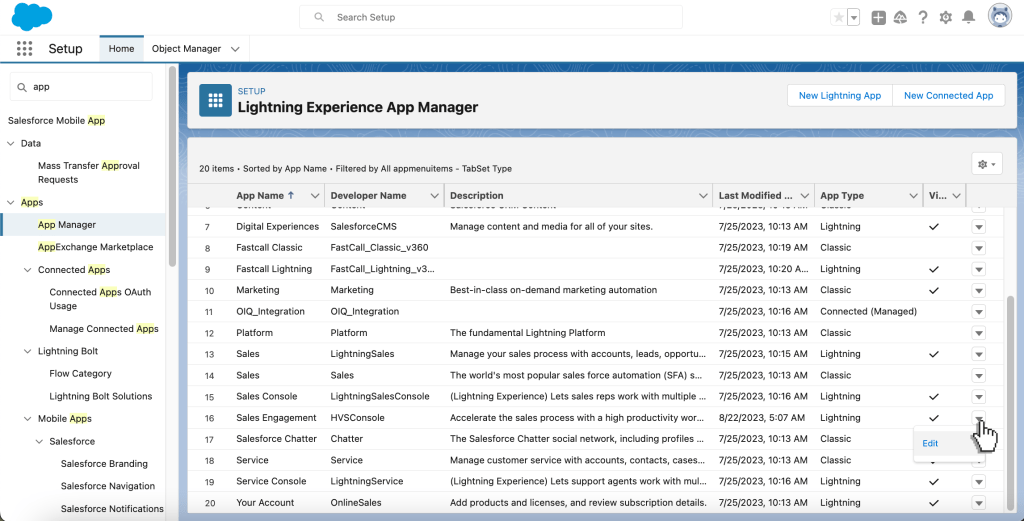
3. In Utility Items click on Add Utility Item button. Search for ‘Open CTI Softphone’ and add it.

4. Return to Sales Engagement and you can see that the Fastcall Widget now is on the footer.

Fastcall in Salesforce Sales Engagement will log your calls as a Task and Call record.
For each call completed in Salesforce Sales Engagement Fastcall will create a Task record with call duration, call subject, call notes, call result, and more. Calls can be recorded.
You can make a call from:
1. The Sales Cadence page.

2. The phone field on the Record page.

3. The phone icon in the Work Queue.

All the options above will open the Fastcall widget and start the call.

Fastcall Features for Sales Engagement
Fastcall seamlessly integrates with Sales Engagement in Salesforce when the following requirements are met:
- Your Salesforce org is using Open CTI for Lightning Experience.
- Your CTI solution uses click-to-dial.
- The saveLog() Open CTI method is used to save a task with a call task type on the related record after the call.
With these prerequisites, Fastcall enhances Sales Engagement, offering key features such as:
- Click-to-dial: Simplify outbound calling with one-click dialing from Salesforce.
- Task Logging: Automatically log call details as tasks associated with the relevant record.
- Cadence advancement based on call completion: Progress leads through your sales cadence upon call completion.
- Cadence branching based on call result: Adapt your cadence flow based on the call results.
- Automatic target exit from cadence based on call result: Automatically remove leads from a cadence based on specific call results.
This integration provides a streamlined experience for your sales team, improving efficiency and engagement.
Fastcall also supports Einstein Conversation Insights so that your recorded calls can be transcribed and analyzed.
Last updated: Fastcall v8.7.2, 2024-09-23